At the moment, I’m working on project where we are using SOAP Webservices to connect the SAP Backend with the Flex Frontend. Before I joined the project, they used a e4x to parse the SOAP Webservice responses. I switched the implementation to use as reponse type object instead of E4X or XML. This switch brings advantages and disadvantages.
Out of the box the Flex soap decoder can handle all objects which are of any type defined be the XSD Schema( string, date, int, boolean…). If your webservice contains ComplexType Objects, you have to define a mapping between the XML structure coming back from the webservice and corresponding ActionScript3 Object. This can be done by using the SchemaTypeRegistry, where you have register your custom classes and collections.
I recommand to add this stuff to SchemaTypeRegistry after the WSDL of webservice was loaded.
Sometimes registration solves not all the decoding problems, that can happen if the WSDL contains Message Parts. In this case, the top level/root object of webservice response will not decoded properly and returns an untype object. To solve this issue, you have to change some parameters of the interface ISOAPDecoder, which is implemented by the decoder of the webservice operation.
This can changes can only applied when the WSDL was successful loaded, otherwhise the step will fail with a NullPointerException.
To get all the necessary information to apply this changes is a little bit tricky if you want to do it manually. I’m using the “Import Web Service (WSDL)” function of Flex Builder 3 to get the information and simply copy and paste them into my project. If your webservice has the name “SearchService” then the importer generates an ActionScript File with the name “BaseSearchService”. You can find all information for your changes in that file.
An other benefit of the importer is the generation of the corresponding ActionScript Class, which speeds up the development of the Flex application when you’re using webservice. Replacing of an complete webservice can be done in a couple minutes.
Now, you asking yourself why I’m not directly using the generated service and classes of the importer. This is a good question. I’m not really liking the code of the generated classes, it creates a wrapper based on an AbstractedWebservice and it isn’t as easy to apply any changes on it. Also if you are working with MVC frameworks like Cairngorm or PureMVC, the wrapper isn’t a valid solution. These frameworks are using Responders and AsyncTokens to handle server responses, but the wrappers are only providing EventListeners and that fits not really together.
The disadvantage of using SchemaType mapping to decode your webservice calls is speed of the decoding. The decoding via SchemaType can take multiple seconds whereas the parsing of the webservice response via E4X or XML needs only a few milliseconds.
James Ward from Adobe provides a small application, which visualize the speed difference between E4X and SchemaType.
My recommandation is to use SchemaType mapping in the early stage of the project or in projects where the webservice will be changed a lot during the development. It’s easier to update the SchemaType mapping and you can’t forgot to map something like you will do if you create your custom mapping with E4X, trust me.
Development Speed vs. Application Speed
Now, you only have decide if you want to exchange the parsing of your webservice before releasing your application. The parsing of the webservice response with a custom mapping based on EX4 is lot faster than SchemaType and users hate nothing more than applications that are slow.
The next version of Adobe LiveCycle will shipped soon and Adobe presented some of the new feature and applications at Adobe MAX in Los Angeles. Adobe presented a LiveCycle Workspace Mobile, a mobile version of Workspace for the Apple iPhone, BlackBerry RIM and Windows Mobile. The iPhone application of Adobe Workspace is now available at the Apple iTunes. The mobile clients will only work together with the upcoming version of LiveCycle ES.
LiveCycle LaunchPad is an other new client, which will be available with LiveCycle ES 2. LaunchPad is a desktop application based on Adobe AIR and enables the user to create PDF or secure documents via Drag and Drop. Developers can easly extend LauchPad with their own processes.
An other new feature of LiveCycle ES 2 is LiveCycle Mosaic. LiveCycle Mosaic is a framework, which let you build rich internet applications based on existing entreprise applications. The information of a existing application will presented as a “Tile” in Mosiac and the different tiles can interaction to exchange information and trigger actions. You can use Flex and HTML to build the tiles.
Adobe is working on a version of the Flex framework for mobile application, Codemane Slider. When I watched the video about the Slider Preview at Max presentation by Ely Greenfield (Adobe), I was totally impressed about the ideas behind Slider. I like the idea how to solve the to integrate into multiple plattforms and Cross Platform developement based on Conditions and Style/Skins. If you want to now what I’m talking about, check the video below. Adobe provides also a white paper at Adobe Labs.
The final version of Spring BlazeDS Integration 1.0 is available now. Since RC2, SpringSource enhanced the documentation and made some improvements on the messaging adapter. More information about the final version are available on the blog of SpringSource and in the offical annoucement.
You can download the BlazeDS Integration here and the documentation can found here.
If you wanted to track a Flash or Flex based application with Google Analytics, you had to use the ExternalInterface to call the function of the JavaScript library. While search for a solution which isn’t using JavaScript, I found out that Google now provides some ActionScript3 libraries for Google Analytics.
You can find the documentation here and the libraries here.
The nice thing about the library is that you have the choice whether you want to use a ActionScript-Only solution or combine JavaScript and ActionScript. The only difference between both solutions is one parameter when calling of constructor of the tracker.
On Wednesday, I found the time to test the annotation based configuration of the Spring BlazeDS Integration. Because it isn’t as easy as I thought, I wrote this little guide with all necessary configurations. You can download the sample project here.
First you have to create a new Flex Project in Flex Builder, select as Application server type “J2EE” and use LiveCycle Data Service as Remoting. Click the button “Next”.
Now you have to select the BlazeDS WAR file and click the button “Finish”.
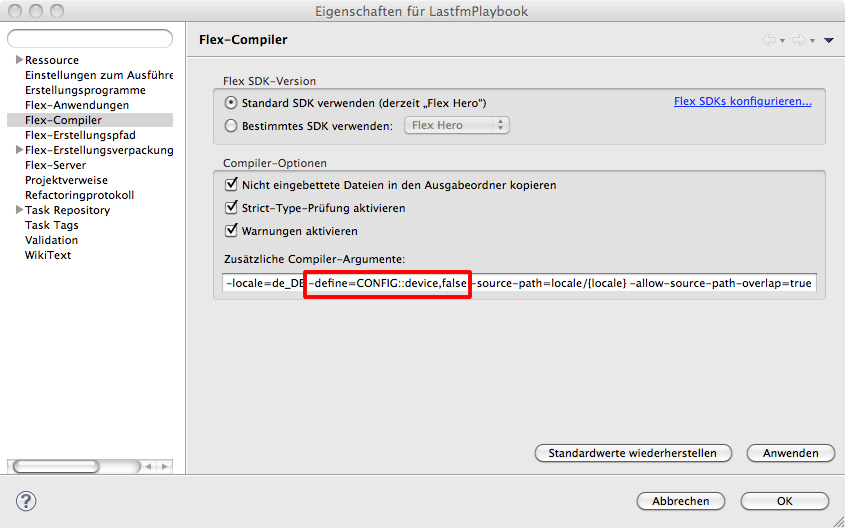
Under Project > Properties > Flex Compiler you have add -services and behind the path to the services-config.xml (Screenhot), like in all other BlazeDS oder LiveCycle DS Applications. During the compile process the compiler creates an Actionscript class with the information of this file. The services-config.xml can found under the WEB-INF/flex. This file contains the definition of the MessageBroker and references to the messaging-config.xml and the remoting-config.xml. In the remoting-config.xml, you can find the definitions of the RemoteObjects and in the messaging-config.xml all messaging configurations.
You can delete these two files because the RemoteObjects and Messaging will now defined in your Spring application. You must also delete the references to these files in the services-config.xml. The content of the services-config.xml should now look like this.
<?xmlversion="1.0"encoding="UTF-8"?><services-config><services><service-includefile-path="proxy-config.xml"/><default-channels><channelref="my-amf"/></default-channels></services><security><login-commandclass="flex.messaging.security.TomcatLoginCommand"server="Tomcat"/><!-- Uncomment the correct app server <login-command class="flex.messaging.security.TomcatLoginCommand" server="JBoss"> <login-command class="flex.messaging.security.JRunLoginCommand" server="JRun"/> <login-command class="flex.messaging.security.WeblogicLoginCommand" server="Weblogic"/> <login-command class="flex.messaging.security.WebSphereLoginCommand" server="WebSphere"/> --><!-- <security-constraint id="basic-read-access"> <auth-method>Basic</auth-method> <roles> <role>guests</role> <role>accountants</role> <role>employees</role> <role>managers</role> </roles> </security-constraint> --></security><channels><channel-definitionid="my-amf"class="mx.messaging.channels.AMFChannel"><endpointurl="http://{server.name}:{server.port}/{context.root}/messagebroker/amf"class="flex.messaging.endpoints.AMFEndpoint"/></channel-definition><channel-definitionid="my-secure-amf"class="mx.messaging.channels.SecureAMFChannel"><endpointurl="https://{server.name}:{server.port}/{context.root}/messagebroker/amfsecure"class="flex.messaging.endpoints.SecureAMFEndpoint"/><properties><add-no-cache-headers>false</add-no-cache-headers></properties></channel-definition><channel-definitionid="my-polling-amf"class="mx.messaging.channels.AMFChannel"><endpointurl="http://{server.name}:{server.port}/{context.root}/messagebroker/amfpolling"class="flex.messaging.endpoints.AMFEndpoint"/><properties><polling-enabled>true</polling-enabled><polling-interval-seconds>4</polling-interval-seconds></properties></channel-definition><channel-definitionid="my-longpolling-amf"class="mx.messaging.channels.AMFChannel"><endpointurl="http://{server.name}:{server.port}/{context.root}/messagebroker/amflongpolling"class="flex.messaging.endpoints.AMFEndpoint"/><properties><polling-enabled>true</polling-enabled><polling-interval-seconds>5</polling-interval-seconds><wait-interval-millis>60000</wait-interval-millis><client-wait-interval-millis>1</client-wait-interval-millis><max-waiting-poll-requests>200</max-waiting-poll-requests><user-agent-settings><!-- MSIE 5, 6, 7 default max number of permanent HTTP connections is 2. --><user-agentmatch-on="MSIE"max-streaming-connections-per-session="1"/><!-- MSIE 8 max number is 6. --><user-agentmatch-on="MSIE 8"max-streaming-connections-per-session="5"/><!-- Firefox 1, 2 max number is 2. --><user-agentmatch-on="Firefox"max-streaming-connections-per-session="1"/><!-- Firefox 3 max number is 6. --><user-agentmatch-on="Firefox/3"max-streaming-connections-per-session="5"/><!-- Safari 3, 4 max number is 4. --><user-agentmatch-on="Safari"max-streaming-connections-per-session="3"/><!-- Chrome 0, 1, 2 max number is 6. --><user-agentmatch-on="Chrome"max-streaming-connections-per-session="5"/><!-- Opera 7, 9 max number is 4.--><user-agentmatch-on="Opera"max-streaming-connections-per-session="3"/><!-- Opera 8 max number is 8. --><user-agentmatch-on="Opera 8"max-streaming-connections-per-session="7"/><!-- Opera 10 max number is 8. --><user-agentmatch-on="Opera 10"max-streaming-connections-per-session="7"/></user-agent-settings></properties></channel-definition><channel-definitionid="my-streaming-amf"class="mx.messaging.channels.StreamingAMFChannel"><endpointurl="http://{server.name}:{server.port}/{context.root}/messagebroker/streamingamf"class="flex.messaging.endpoints.StreamingAMFEndpoint"/></channel-definition><!-- <channel-definition id="my-http" class="mx.messaging.channels.HTTPChannel"> <endpoint url="http://{server.name}:{server.port}/{context.root}/messagebroker/http" class="flex.messaging.endpoints.HTTPEndpoint"/> </channel-definition> <channel-definition id="my-secure-http" class="mx.messaging.channels.SecureHTTPChannel"> <endpoint url="https://{server.name}:{server.port}/{context.root}/messagebroker/httpsecure" class="flex.messaging.endpoints.SecureHTTPEndpoint"/> <properties> <add-no-cache-headers>false</add-no-cache-headers> </properties> </channel-definition> --></channels><logging><targetclass="flex.messaging.log.ConsoleTarget"level="Warn"><properties><prefix>[BlazeDS] </prefix><includeDate>false</includeDate><includeTime>false</includeTime><includeLevel>false</includeLevel><includeCategory>false</includeCategory></properties><filters><pattern>Endpoint.*</pattern><pattern>Service.*</pattern><pattern>Configuration</pattern></filters></target></logging><system><redeploy><enabled>false</enabled><!-- <watch-interval>20</watch-interval> <watch-file>{context.root}/WEB-INF/flex/services-config.xml</watch-file> <watch-file>{context.root}/WEB-INF/flex/proxy-config.xml</watch-file> <watch-file>{context.root}/WEB-INF/flex/remoting-config.xml</watch-file> <watch-file>{context.root}/WEB-INF/flex/messaging-config.xml</watch-file> <watch-file>{context.root}/WEB-INF/flex/data-management-config.xml</watch-file> <touch-file>{context.root}/WEB-INF/web.xml</touch-file> --></redeploy></system></services-config>
Now you have to configurate the Dispatcher Servlet, which get the information from the Flex application. Normally, you can find the definition of the MessageBroker Servlet in the web.xml. The Spring BlazeDS integration defines the MessageBroker in applicationContext.xml and uses a Dispatcher Servlet to transfer the Flex request to the MessageBroker. So, you have to replace the Flex related configuration in the web.xml. The file should now look like this:
Now, you need a configuration file for the DispatcherServlet. Because I named the DispatcherServlet instance “dispatcherServlet”, I have to create a file with the name “dispatcherServlet-servlet.xml” in the folder WEB-INF.
The next step is to configurate the MessageBroker in applicationContext.xml. Till now, you can use also for not annotated configuration of Spring BlazeDS integration.
A annotated configuration needs some additional lines to scan the source for the spring annotations. The base-package specifies where Spring should start to search for annotations.
The last step is to add the annotation in the Java class. You have to add the @Services, the @RemoteDestintion and the protocol you will use for the transfer above the class definition. When a method should be accessable via BlazeDS, you have to add above this method @RemoteInclude annotation otherwhise the @RemoteExclude annotation.
packagetest;importorg.springframework.flex.remoting.RemotingDestination;importorg.springframework.flex.remoting.RemotingExclude;importorg.springframework.flex.remoting.RemotingInclude;importorg.springframework.stereotype.Service;
@Service
@RemotingDestination(channels={"my-amf","my-secure-amf"})publicclass SampleService {// accessable via BlazeDS
@RemotingInclude
publicString getMessage(String name){return"Hello "+name;}// not accessable via BlazeDS
@RemotingExclude
publicString getMessage2(String name){return"Hello "+name;}}
The name of the RemoteObject is same as Java class name but with the first letter is a lowercase. In my example the name of the RemoteObject is “sampleService”.
Yesterday Ted Patrick officially announced that the upcoming version of Flex Builder will renamed to Flash Builder via Twitter. The last months Adobe forced to speak about the Flash Platform, the new interaction design tool for Flex application was called Flash Catalyst and now the next foreseeable step comes: Flex Builder becomes Flash Builder.
I’m not really sure, what I should think about the hole renaming. From the stand point of Product Marketing, it’s clear. The end result of all IDEs is a SWF running in the Flash Player. In the entreprise world, Flash has no good reputation. This is cause the millions of bad animations and ad banner produced with Flash in the last years. I don’t think the renaming of the product makes it easier to convince decision maker to use Flex for their applications. If Flash hadn’t this negative connotation this renaming wouldn’t be as critical as it is. It looks like we must start talking about the Flex Framework instead of Flex.
PS: Ted Patrick, who announced the renaming changed the name of his blog from “Ted on Flex” (onflex.org) to “Ted on Flash” (onflash.org) about 3 months ago.
PSS: SAP calls it Flex based solutions also Flash Islands and not Flex Islands.
One of the new features is the annotation-based configuration of Remote Desitinations. You can include and exclude function, which should publish as Remote Objects. The annotation-based configuration really simplifies the configuration of BlazeDS, if you have a big and complex application. Loving it.
An other feature of this release is the full integration of the BlazeDS Message Service.
Next Thursday, Adobe and SpringSource having a Connect Session/eSemiar about the Spring BlazeDS Integration.
On time for the World Table Tennis Championships in Yokohama, the website of the German Table Tennis League (dttl.tv) was relaunched last week. The main element of the relaunched website is a new video player, based on Adobe Flex and the Adobe Flash Media Server. You can find all games of the German Table Tennis League in full length, interviews and the top rally of the day.
On May 15th 2009, the first live stream (19th match day of the German Table Tennis League) of the new website will avalaible.
To manage all the videos and streams, the player has a backend system based on BlazeDS, Spring and Hibernate.
Have fun and visit the website of the best Table Tennis League worldwide to see some of the most brillant table tennis players.