11. Juni 2009

Spring BlazeDS Integration 1.0 is available

Abgelegt unter: Allgemein, BlazeDS, Flex — Patrick | 11:29 Digg It!

The final version of Spring BlazeDS Integration 1.0 is available now. Since RC2, SpringSource enhanced the documentation and made some improvements on the messaging adapter. More information about the final version are available on the blog of SpringSource and in the offical annoucement.

You can download the BlazeDS Integration here and the documentation can found here.

BlazeDS BlazeDS  Remote Object Remote Object  Spring Spring 

16. Mai 2009

Using annotated RemoteServices with the Spring BlazeDS Integration

Abgelegt unter: Adobe, BlazeDS, Flex, Technologie — Patrick | 19:30 Digg It!

On Wednesday, I found the time to test the annotation based configuration of the Spring BlazeDS Integration. Because it isn’t as easy as I thought, I wrote this little guide with all necessary configurations. You can download the sample project here.

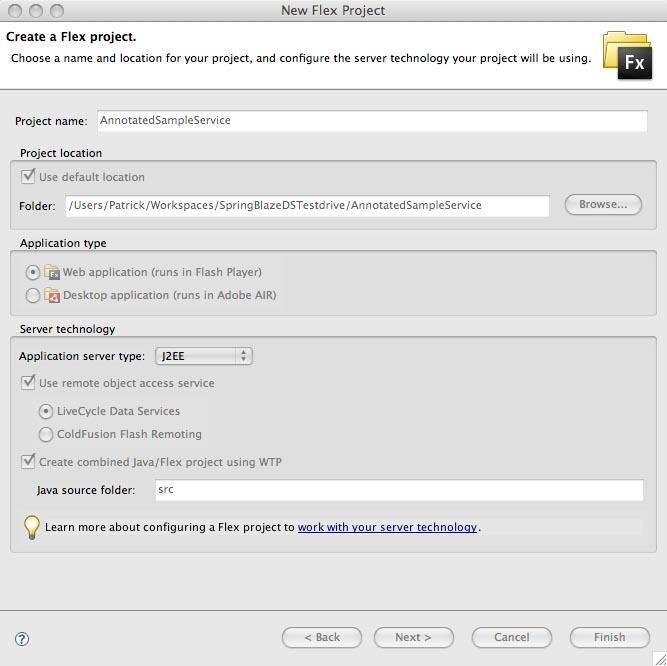
First you have to create a new Flex Project in Flex Builder, select as Application server type “J2EE” and use LiveCycle Data Service as Remoting. Click the button “Next”.
annotated_spring_blazeds_step1

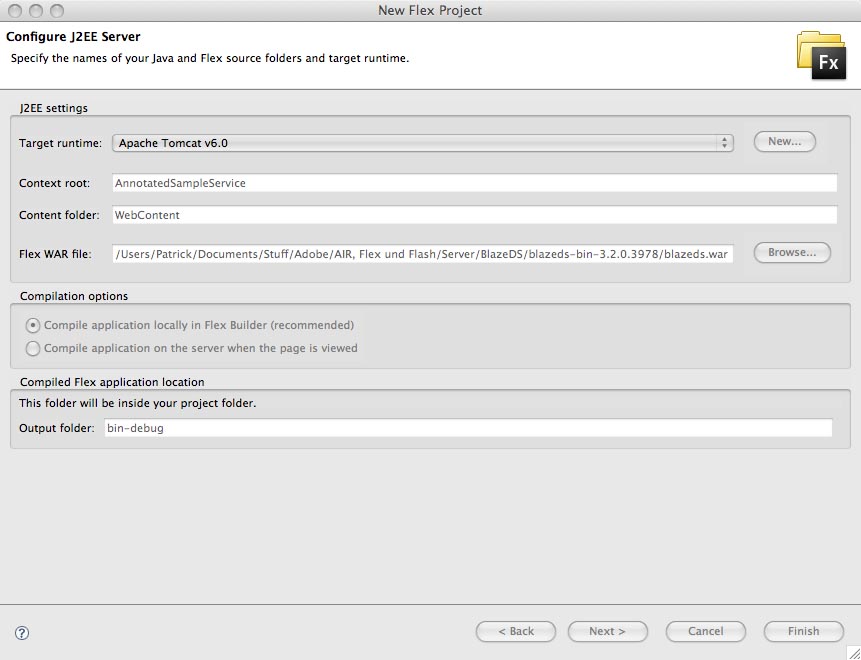
Now you have to select the BlazeDS WAR file and click the button “Finish”.
annotated_spring_blazeds_step2

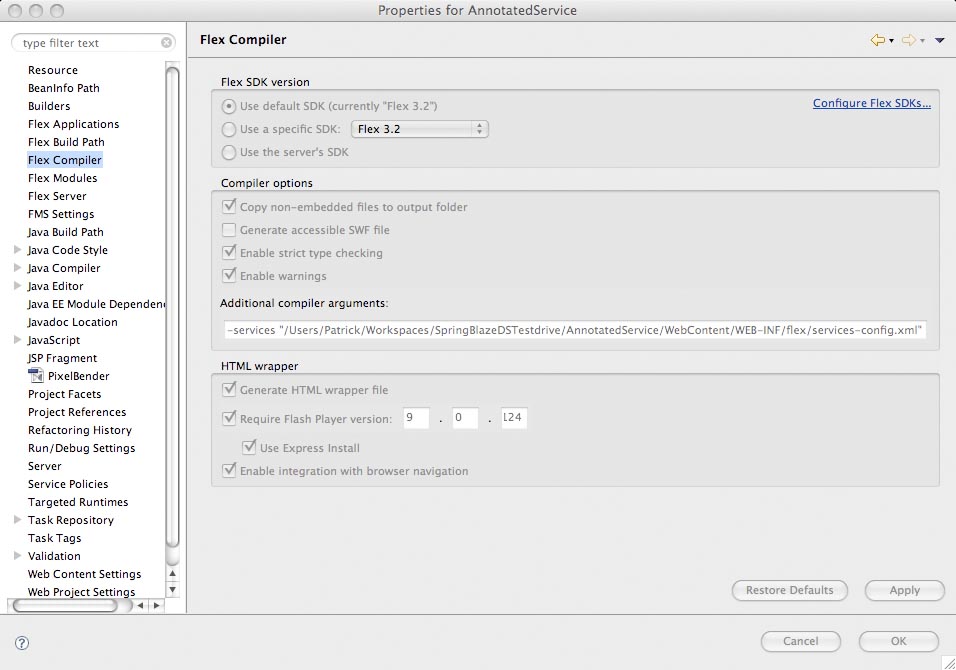
Under Project > Properties > Flex Compiler you have add -services and behind the path to the services-config.xml (Screenhot), like in all other BlazeDS oder LiveCycle DS Applications. During the compile process the compiler creates an Actionscript class with the information of this file. The services-config.xml can found under the WEB-INF/flex. This file contains the definition of the MessageBroker and references to the messaging-config.xml and the remoting-config.xml. In the remoting-config.xml, you can find the definitions of the RemoteObjects and in the messaging-config.xml all messaging configurations.
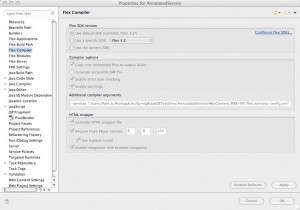
services-config-xml

You can delete these two files because the RemoteObjects and Messaging will now defined in your Spring application. You must also delete the references to these files in the services-config.xml. The content of the services-config.xml should now look like this.

<?xml version="1.0" encoding="UTF-8"?>
<services-config>
 
    <services>
        <service-include file-path="proxy-config.xml" />
 
        <default-channels>
           <channel ref="my-amf"/>
        </default-channels>
 
    </services>
 
 
    <security>
        <login-command class="flex.messaging.security.TomcatLoginCommand" server="Tomcat"/>
        <!-- Uncomment the correct app server
        <login-command class="flex.messaging.security.TomcatLoginCommand" server="JBoss">
		<login-command class="flex.messaging.security.JRunLoginCommand" server="JRun"/>        
        <login-command class="flex.messaging.security.WeblogicLoginCommand" server="Weblogic"/>
        <login-command class="flex.messaging.security.WebSphereLoginCommand" server="WebSphere"/>
        -->
 
        <!-- 
        <security-constraint id="basic-read-access">
            <auth-method>Basic</auth-method>
            <roles>
                <role>guests</role>
                <role>accountants</role>
                <role>employees</role>
                <role>managers</role>
            </roles>
        </security-constraint>
         -->
    </security>
 
    <channels>
 
        <channel-definition id="my-amf" class="mx.messaging.channels.AMFChannel">
            <endpoint url="http://{server.name}:{server.port}/{context.root}/messagebroker/amf" class="flex.messaging.endpoints.AMFEndpoint"/>
        </channel-definition>
 
        <channel-definition id="my-secure-amf" class="mx.messaging.channels.SecureAMFChannel">
            <endpoint url="https://{server.name}:{server.port}/{context.root}/messagebroker/amfsecure" class="flex.messaging.endpoints.SecureAMFEndpoint"/>
            <properties>
                <add-no-cache-headers>false</add-no-cache-headers>
            </properties>
        </channel-definition>
 
        <channel-definition id="my-polling-amf" class="mx.messaging.channels.AMFChannel">
            <endpoint url="http://{server.name}:{server.port}/{context.root}/messagebroker/amfpolling" class="flex.messaging.endpoints.AMFEndpoint"/>
            <properties>
                <polling-enabled>true</polling-enabled>
                <polling-interval-seconds>4</polling-interval-seconds>
            </properties>
        </channel-definition>
 
	<channel-definition id="my-longpolling-amf" class="mx.messaging.channels.AMFChannel">
		<endpoint url="http://{server.name}:{server.port}/{context.root}/messagebroker/amflongpolling" class="flex.messaging.endpoints.AMFEndpoint"/>
		<properties>
			<polling-enabled>true</polling-enabled>
			<polling-interval-seconds>5</polling-interval-seconds>
			<wait-interval-millis>60000</wait-interval-millis>
			<client-wait-interval-millis>1</client-wait-interval-millis>
			<max-waiting-poll-requests>200</max-waiting-poll-requests>
                	<user-agent-settings>
				<!-- MSIE 5, 6, 7 default max number of permanent HTTP connections is 2. -->
				<user-agent match-on="MSIE" max-streaming-connections-per-session="1"/>
				<!-- MSIE 8 max number is 6. -->
				<user-agent match-on="MSIE 8" max-streaming-connections-per-session="5"/>
				<!-- Firefox 1, 2 max number is 2. --> 
				<user-agent match-on="Firefox" max-streaming-connections-per-session="1"/>
				<!-- Firefox 3 max number is 6. -->
				<user-agent match-on="Firefox/3" max-streaming-connections-per-session="5"/>
				<!-- Safari 3, 4 max number is 4. -->  
				<user-agent match-on="Safari" max-streaming-connections-per-session="3"/>
				<!-- Chrome 0, 1, 2 max number is 6. -->
				<user-agent match-on="Chrome" max-streaming-connections-per-session="5"/>
				<!-- Opera 7, 9 max number is 4.-->
				<user-agent match-on="Opera" max-streaming-connections-per-session="3"/>
				<!-- Opera 8 max number is 8. -->  
				<user-agent match-on="Opera 8" max-streaming-connections-per-session="7"/>
				<!-- Opera 10 max number is 8. -->
				<user-agent match-on="Opera 10" max-streaming-connections-per-session="7"/>
                	</user-agent-settings>
		</properties>
	</channel-definition>        
 
        <channel-definition id="my-streaming-amf" class="mx.messaging.channels.StreamingAMFChannel">
            <endpoint url="http://{server.name}:{server.port}/{context.root}/messagebroker/streamingamf" class="flex.messaging.endpoints.StreamingAMFEndpoint"/>
        </channel-definition>
 
        <!--
        <channel-definition id="my-http" class="mx.messaging.channels.HTTPChannel">
            <endpoint url="http://{server.name}:{server.port}/{context.root}/messagebroker/http" class="flex.messaging.endpoints.HTTPEndpoint"/>
        </channel-definition>
 
        <channel-definition id="my-secure-http" class="mx.messaging.channels.SecureHTTPChannel">
            <endpoint url="https://{server.name}:{server.port}/{context.root}/messagebroker/httpsecure" class="flex.messaging.endpoints.SecureHTTPEndpoint"/>
            <properties>
                <add-no-cache-headers>false</add-no-cache-headers>
            </properties>
        </channel-definition>
        -->
    </channels>
 
    <logging>
        <target class="flex.messaging.log.ConsoleTarget" level="Warn">
            <properties>
                <prefix>[BlazeDS] </prefix>
                <includeDate>false</includeDate>
                <includeTime>false</includeTime>
                <includeLevel>false</includeLevel>
                <includeCategory>false</includeCategory>
            </properties>
            <filters>
                <pattern>Endpoint.*</pattern>
                <pattern>Service.*</pattern>
                <pattern>Configuration</pattern>
            </filters>
        </target>
    </logging>
 
    <system>
        <redeploy>
            <enabled>false</enabled>
            <!-- 
            <watch-interval>20</watch-interval>
            <watch-file>{context.root}/WEB-INF/flex/services-config.xml</watch-file>
            <watch-file>{context.root}/WEB-INF/flex/proxy-config.xml</watch-file>
            <watch-file>{context.root}/WEB-INF/flex/remoting-config.xml</watch-file>
            <watch-file>{context.root}/WEB-INF/flex/messaging-config.xml</watch-file>
            <watch-file>{context.root}/WEB-INF/flex/data-management-config.xml</watch-file>
            <touch-file>{context.root}/WEB-INF/web.xml</touch-file>
             -->
        </redeploy>
    </system>
 
</services-config>

Now you have to configurate the Dispatcher Servlet, which get the information from the Flex application. Normally, you can find the definition of the MessageBroker Servlet in the web.xml. The Spring BlazeDS integration defines the MessageBroker in applicationContext.xml and uses a Dispatcher Servlet to transfer the Flex request to the MessageBroker. So, you have to replace the Flex related configuration in the web.xml. The file should now look like this:

<?xml version="1.0" encoding="UTF-8"?>
<web-app id="WebApp_ID" version="2.4" xmlns="http://java.sun.com/xml/ns/j2ee" xmlns:xsi="http://www.w3.org/2001/XMLSchema-instance" xsi:schemaLocation="http://java.sun.com/xml/ns/j2ee http://java.sun.com/xml/ns/j2ee/web-app_2_4.xsd">
	<display-name>AnnotatedService</display-name>
 
	<context-param>
		<param-name>contextConfigLocation</param-name>
		<param-value>
			/WEB-INF/config/web-application-config.xml
		</param-value>
	</context-param>
 
 
	<listener>
		<listener-class>org.springframework.web.context.ContextLoaderListener</listener-class>
	</listener>
 
	<servlet>
		<servlet-name>dispatcherServlet</servlet-name>
		<servlet-class>org.springframework.web.servlet.DispatcherServlet</servlet-class>
		<load-on-startup>1</load-on-startup>
	</servlet>
 
	<servlet-mapping>
    	<servlet-name>dispatcherServlet</servlet-name>
    	<url-pattern>/messagebroker/*</url-pattern>
 	</servlet-mapping>
 
     <welcome-file-list>
		<welcome-file>main.html</welcome-file>
	</welcome-file-list>
</web-app>

Now, you need a configuration file for the DispatcherServlet. Because I named the DispatcherServlet instance “dispatcherServlet”, I have to create a file with the name “dispatcherServlet-servlet.xml” in the folder WEB-INF.

<?xml version="1.0" encoding="UTF-8"?>
<beans xmlns="http://www.springframework.org/schema/beans"
    xmlns:xsi="http://www.w3.org/2001/XMLSchema-instance"
    xsi:schemaLocation="http://www.springframework.org/schema/beans http://www.springframework.org/schema/beans/spring-beans-2.0.xsd">
 
</beans>

The next step is to configurate the MessageBroker in applicationContext.xml. Till now, you can use also for not annotated configuration of Spring BlazeDS integration.

	<flex:message-broker>
		<flex:message-service default-channels="my-streaming-amf,my-longpolling-amf,my-polling-amf" />
	</flex:message-broker>

A annotated configuration needs some additional lines to scan the source for the spring annotations. The base-package specifies where Spring should start to search for annotations.

	<context:annotation-config />
	<context:component-scan base-package="org.company" />

The applicationContext.xml should look like this:

<?xml version="1.0" encoding="UTF-8"?>
<beans xmlns="http://www.springframework.org/schema/beans"
	xmlns:flex="http://www.springframework.org/schema/flex"
	xmlns:xsi="http://www.w3.org/2001/XMLSchema-instance"
	xmlns:context="http://www.springframework.org/schema/context"
	xsi:schemaLocation="
		http://www.springframework.org/schema/beans
		http://www.springframework.org/schema/beans/spring-beans-2.5.xsd
		http://www.springframework.org/schema/flex 
		http://www.springframework.org/schema/flex/spring-flex-1.0.xsd
		http://www.springframework.org/schema/context
		http://www.springframework.org/schema/context/spring-context-2.5.xsd">
 
	<context:annotation-config />
	<context:component-scan base-package="org.company" />
 
	<flex:message-broker>
		<flex:message-service default-channels="my-streaming-amf,my-longpolling-amf,my-polling-amf" />
	</flex:message-broker>
 
</beans>

The last step is to add the annotation in the Java class. You have to add the @Services, the @RemoteDestintion and the protocol you will use for the transfer above the class definition. When a method should be accessable via BlazeDS, you have to add above this method @RemoteInclude annotation otherwhise the @RemoteExclude annotation.

package test;
 
import org.springframework.flex.remoting.RemotingDestination;
import org.springframework.flex.remoting.RemotingExclude;
import org.springframework.flex.remoting.RemotingInclude;
import org.springframework.stereotype.Service;
 
@Service
@RemotingDestination(channels={"my-amf","my-secure-amf"})
public class SampleService {
 
	// accessable via BlazeDS
	@RemotingInclude
	public String getMessage(String name){
		return "Hello "+name;
	}
 
	// not accessable via BlazeDS
	@RemotingExclude
	public String getMessage2(String name){
		return "Hello "+name;
	}
}

The name of the RemoteObject is same as Java class name but with the first letter is a lowercase. In my example the name of the RemoteObject is “sampleService”.

<?xml version="1.0" encoding="utf-8"?>
<mx:Application xmlns:mx="http://www.adobe.com/2006/mxml" layout="absolute">
	<mx:RemoteObject id="service" destination="sampleService" result="onResult(event)" fault="onFault(event)"/>
	<mx:Script>
		<![CDATA[
			import mx.rpc.events.FaultEvent;
			import mx.rpc.events.ResultEvent;
			import mx.controls.Alert;
 
			private function getMessage():void
			{
				this.service.getMessage(inputName.text);
			}
 
			private function onResult(event:Object):void
			{
				Alert.show(event.result as String, "Spring says");
			}
 
			private function onFault(event:FaultEvent):void
			{
				Alert.show("Something was wrong :(","Fault");
			}
		]]>
	</mx:Script>
	<mx:Button label="go" click="getMessage()" x="100" y="56"/>
	<mx:TextInput id="inputName" x="100" y="26"/>
	<mx:Label x="21" y="28" text="Your Name:"/>
</mx:Application>

I hope this guide helps setting up a Spring BlazeDS application using annotations.
Annotations Annotations  BlazeDS BlazeDS  Remote Object Remote Object  Spring Spring 

7. Mai 2009

Spring BlazeDS Integration 1.0.0.RC1 Released

Abgelegt unter: BlazeDS, Flex, Technologie — Patrick | 02:16 Digg It!

Today, Spring published the first Release Candiate of the Spring BlazeDS Integration. http://www.springsource.org/spring-flex

One of the new features is the annotation-based configuration of Remote Desitinations. You can include and exclude function, which should publish as Remote Objects. The annotation-based configuration really simplifies the configuration of BlazeDS, if you have a big and complex application. Loving it.
An other feature of this release is the full integration of the BlazeDS Message Service.

Next Thursday, Adobe and SpringSource having a Connect Session/eSemiar about the Spring BlazeDS Integration.

Registration: http://www.adobe.com/cfusion/event/i…2539&loc=en_us

Annotations Annotations  Flex Flex  Java Java  Message Service Message Service  Remote Object Remote Object  Spring Spring 

5. Mai 2009

dttl.tv relaunched!

Abgelegt unter: BlazeDS, Flash Media Server, Flex, Projekte — Patrick | 15:00 Digg It!

On time for the World Table Tennis Championships in Yokohama, the website of the German Table Tennis League (dttl.tv) was relaunched last week. The main element of the relaunched website is a new video player, based on Adobe Flex and the Adobe Flash Media Server. You can find all games of the German Table Tennis League in full length, interviews and the top rally of the day.

On May 15th 2009, the first live stream (19th match day of the German Table Tennis League) of the new website will avalaible.

To manage all the videos and streams, the player has a backend system based on BlazeDS, Spring and Hibernate.

Have fun and visit the website of the best Table Tennis League worldwide to see some of the most brillant table tennis players.

dttl.tv dttl.tv  Flash Media Server Flash Media Server  Flex Flex  Hibernate Hibernate  Spring Spring  Table Tennis Table Tennis 

19. Dezember 2008

SpringSource veröffentlicht ersten Milestone der Spring BlazeDS Integration

Abgelegt unter: Adobe, BlazeDS, Flex, Technologie — Patrick | 23:32 Digg It!

Heute hat SpringSource den ersten Milestone der Spring BlazeDS Integration veröffentlicht. Informationen zum Spring BlazeDS Integration finden sich jetzt auch auf der SpringSource Webseite, dort werden eine Referenz Dokumentation, eine JavaDoc und natürlich auch den Downloads zur Verfügung gestellt. Zusätzlich gibt weitere Informationen in einem Blog und einem Forum zur Spring BlazeDS Integration.

Sobald ich selber mal ein Auge auf die Integration geworfen habe, folgen weitere Informationen.

Flex Flex  Spring Spring 

13. Dezember 2008

Adobe und SpringSource kooperieren bei der Integration von Flash und Spring Plattformen

Abgelegt unter: AIR, Adobe, Allgemein, BlazeDS, Diplomarbeit, Flex, Masterthesis, Technologie — Patrick | 00:38 Digg It!

Adobe und SpringSource haben bekanntgegeben, dass beide der Integration von der Adobe Flash Plattform und Spring Plattform kooperieren. Ziel der Kooperation ist es, die Entwicklung von RIA mittels BlazeDS oder LiveCycle DS und Spring zuvereinfachen. Eine erste Beta-Version der BlazeDS Spring Integration soll Mitte Dezember verfübar sein.

Desweiteren soll ein SpringSource Adapter for Adobe LiveCycle Data Services ES entwicklet werden, welche wohl in einer der kommenden Versionen von den LiveCycle DS verfügbar sein wird. Der Adapter soll den Data Push aus Spring direkt zu Flex ermöglichen.

Link zur gemeinsamen Pressemitteilung von Adobe und SpringSource.

Flex Flex  LiveCycle DS LiveCycle DS  Spring Spring