AEMHUB is a new conference about Adobe Experience Manager, which will be taking place in London from 9th and 10th of April 2014.
My colleague Heiko and I from Harbour Light Ltd. will be speaking about “Socialize your Exceptional Web Experience – Adobe AEM & IBM Connections” @ AEMHUB. In this session, we will present you the technical aspects of integrating IBM Connections into Adobe Experience Manager using IMPRISIS CA and show how we solved common issues like integration of third party appliations or Single SignOn. As every customer has a own corporate design, we will demo how easy it is to customize the look and feel of the components for your own projects.
Beside all this technical aspects, will be talking about why we think that IBM Connections is a great addition to Adobe Experience Manager to solve some common challenges in the space of social web applications.
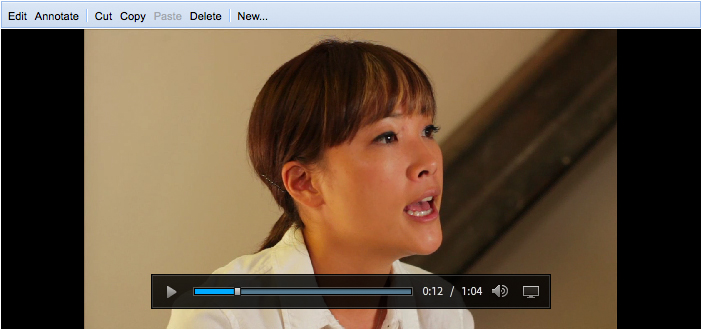
To get a sneak peak about IMPRISIS CA, checkout this video which shows how to integrate a forum of IBM Connections as component into Adobe Experience Manager.
Hope to see you in London!
Comments Off on We will be speaking about integrating IBM Connections and Adobe Experience Manager @ AEMHub in London!
If you build a mobile Adobe AIR app to play or stream audio, the user expects that the music continues to playback when the app goes in the background. When I developed ON AIR powered by Last.fm (Last.fm application using Adobe AIR and targeting tablet devices), had to solve this problem.
Dependent mobile platform, you have to do different things to enable the audio playback in the background!
BlackBerry PlayBook Tablet OS
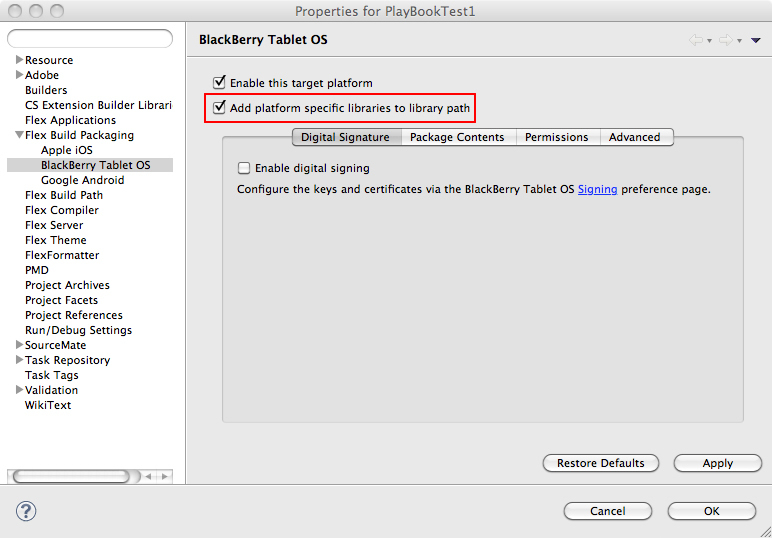
The PlayBook normally pauses your app, when the app is going into the background and stops everything including the playback of the audio. This is the default behaviour. QNX (Part of RIM/BlackBerry) provides two ActionScript3 libraries which allows to the OS UI Components (qnx-screens.swc) in your app or use OS features or capabilities like QNXSystemPowerMode (qnx-air.swc). These libraries will be shipped with the latest version 4.5.1 of Flash Builder. To add the BlackBerry ActionScript Libraries to the project, you have to enable a property “Add platform specific libraries to library path” in the Project Properties (Flex Build Packaging -> BlackBerry Tablet OS).
After enabling the libraries, you only have to add the following lines which sets the PowerMode when the app inactive in the background to THROTTLED.
In the PowerMode THROTTLED, the AIR runtime is stopping the rendering but still executes the code to playback the audio.
Here is the documentation about the PowerMode of QNX.
Google Android
On Android, the audio playback in the background is dependent of the device OS version. As multitasking on Android is available since version 3.0 (Honeycomb), only apps running on devices using Honeycomb or later will playback audio in the background.
To ensure that the app is still running when the user isn’t doing anything, you should add following line to keep the app awake.
Here is the corresponding ActionScript3 documentation. To enable the AIR app to change system idle, the Android part of the AIR App Descriptor file has to contain the following uses permessions.
Normally, an AIR app (or native app) on iOS is stopping the audio playback when the app is going in the background. With Adobe AIR 3.0, you can enable the Background Audio Playback for AIR application. Add the parameter UIBackgroundModes with the value audio to the iOS part of the app descriptor of your application.
Currently, AIR 3.0 has problem with the screen lock of iOS, which is disabling the background audio playback.
To prevent the screen lock on iOS, your app should use the System Idle Mode KEEP_AWAKE.
There were some confusion in the Last.fm community, that my Last.fm application for PlayBook, iPad and Android Tablets is an official Last.fm application. I decided to rebrand the application using the new name “ON AIR powered by Last.fm”. ON AIR wasn’t only a hit about the used technology, it is also a common term in the broadcasting world. When a radio station produces their program, they switch on a red light with the letters “ON AIR”. So when starting the last.fm application, you are “ON AIR” with your personal radio station.
The rebranded apps are available as an update at Android Market, BlackBerry AppWorld, Apple iTunes App Store.
I really overwhelmed of the amazing launch on the different App Stores, especially on Apple’s iTunes App Store: Last.fm ON AIR for the Apple iPad was downloaded 872 times in the first 27 hours after the launch! The Last.fm ON AIR for the BlackBerry PlayBook was downloaded about 470 times in first 8 days since release on BlackBerry AppWorld. As the Android Market has an problem to display the correct number of installations, I can’t really tell you how many installations of the Last.fm ON AIR for Android Tablets were downloaded. But I guess the number isn’t as high because the app was designed to run on Tablet using Android Honeycomb (3.x) like Samsung Galaxy Tab 10.1 or Motorola XOOM.
This afternoon, I also checked some of the international iTunes App Store in the following category: iPad Apps > Music > Free > Bestseller:
Germany: 13th place
UK: 15th place
US: 33th place
Switzerland: 20th place
Brazi: 19th place
Australia: 29th place
Overall, I think was a great start for this project, because I’m sitting in front of my computer and can’t get the smiling out of my face! The main reason for it, I’m working on my Last.fm projects quiet for a while, because it was also my private project to test new stuff coming to the Flash Platform. So I really happy that I finally launched the project.
Information about all my Last.fm projects include the Last.fm ON AIR can be found on my Labs page.
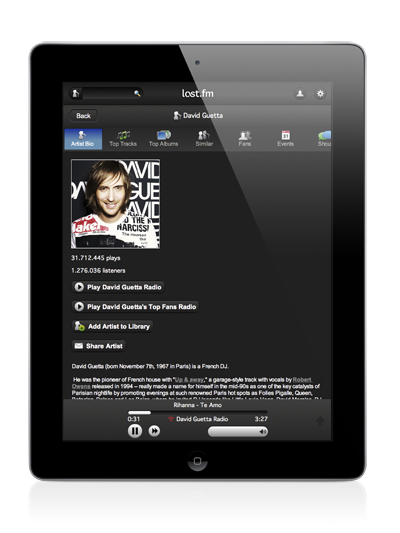
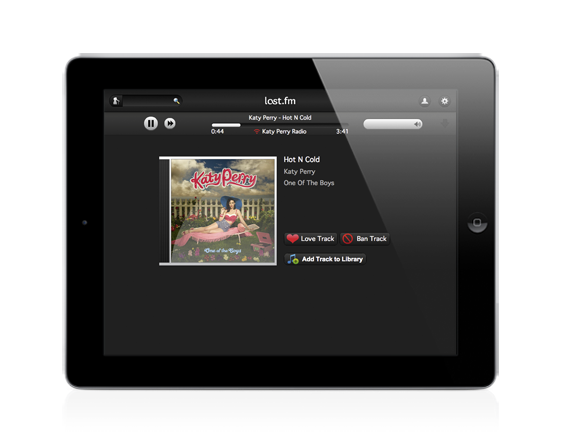
Last.fm ON AIR allows you to search or listen to your favorite artists, tracks or albums. You manage your music library and scrobble the music you currently listen. Find nearby events and upload your tagged event photos directly to Flickr linked to the Last.fm event page.
A Last.fm subscription (PAID) is necessary to use the radio capabilities of the application.
The application provides following functionality:
Listen to stations and Scrobbling (Paid Subscriber Only!)
Love and Ban Tracks
Add Artists, Albums and Tracks to your Library.
Search and Viewing informations about: Artists, Albums, Tracks, Events and Users
Attending Events
Landscape and Portrait Mode
Location based services (Find Events)
Uploading tagged Event Photos to Flickr
Add support for shouts
Device Integration: Use the buttons of the device to control application (Play/Pause/Skip/Change Volume). (Only BlackBerry PlayBook)
Open Music store to buy and search for artists, tracks and albums. (Only BlackBerry PlayBook)
Here are the links to the application Last.fm ON AIR at the different App Stores.
Thanks to the Last.fm team for allowing me to use their logo for my application.
Development and Design
The application is based on Adobe AIR 2.7 using Flex 4.5.1, which is optimzed for iOS application for Adobe AIR. As part of this project, I created my own Flex Library for the Last.fm. This library is implementing the latest Last.fm webservice API using OpenSource Flex MVC Framework Parsley. I will release this library as soon as I have finished the documentation for it.
For Design, I used Adobe Illustrator and Adobe Photoshop. I also used Adobe Flash Catalyst for my transforming my design into assets, because Flash Catalyst is a great tool to convert assets into FXG files for ActionScript Skins(Create Workflow to create FXG assets for ActionScript Skins). The reason why I didn’t used Illustrator for step is that I found no way to export multiple FXG files from Illustrator file.
In the next days, I will write some blog post about what I learned in this project. For example: How to create Progressbar for Mobile AIR applications.
Comments Off on Last.fm ON AIR is available for BlackBerry PlayBook, Android Tablets and Apple iPad now!
Today, I released an other small project which allows to use the Strobe Media Playback inside of Adobe’s Web Experience Management Platform (formly known as Adobe/Day CQ5). Strobe is based on the Open Source Media Framework. The playback is deeply integrated so that you can directly specify all parameters inside of CQ5 component and it can use the content repository of CQ5 or any web and streaming server as media source.
The current version of the component is using the Strobe Media Playback version 1.5.1 and Flash Player 10.1. A future version of the component will also provide the possibility to use the hosted version of Strobe, the Adobe Flash Media Playback.
More information about the project can be found here.
Comments Off on Strobe Media Playback for Adobe Web Experience Management released!
Last night, I released an other small library, which allows you to use the Yahoo! PlaceFinder Webservice with Flex and ActionScript3. The library is based on Parsley, because I have developed the library for my Last.fm projects which use Parsley as application framework.
Yahoo! PlaceFinder Webservice allows to find addresses based on address parts or GPS geolocation information (latitude and longitude).
As Yahoo will discontinue and shut down their Maps Web Service in September, the Yahoo PlaceFinder Webservice can be use as replacement of GeoCoding APIs of the Maps Web Service.
An example, the documentation and the library can be found here.
Comments Off on ActionScript3 Library for Yahoo! PlaceFinder Webservice released
I released the first version of the Flash Mobile Device Simulation and an update of the PlayBook Device Simulation tonight. After the great response on the PlayBook Device Simulation, I decided to extend the solution and provide something similar for all mobile platforms supporting AIR applications. I recreated the ActionScript Simulation Library and the AIR Simulator application from scratch. The Flash Mobile Device Simulation provides features which are available for all mobile platforms and core functionality for the comminication between the mobile application and the AIR Simulator application. The PlayBook Device Simulation extends the Flash Mobile Device Simulation with PlayBook specific features.
The first version of the Flash Mobile Device Simulation supports Geolocation and Accelerometer and provides the possibilty to import simulation information as XML data, for example as GPS Exchange Format 1.1 (GPX) waypoints.
Additionally to the new features of the Flash Mobile Device Simulation, the PlayBook Device Simulation was updated to implement the latest BlackBerry PlayBook SDK 1.0.1 and supports qnx.system.QNXSystem. To run the PlayBook Device Simulation, you have download both ActionScript libraries.
The latest version supports the toggling of the Track Highlight visiblity using the property showTrackHighlight and changing the Track Highlight color using the property accentColor. The default color of the Track Highlight using the themeColor. Everything works like the old MX Slider.
Also I fixed the problem with the clicking the Track Highlight.
The source code of the sliders is available on GitHub.
Comments Off on Updated the Spark Slider with Track Highlight
On time for Flash Game Summit in San Fransisco today, Adobe started a new Incubator Programm for the Flash Platform and released the first public incubator version of the Flash Player 11 supporting the 3D Molehill API. It’s available for download on Adobe Labs.
Adobe’s Product Manager for the Flash Runtimes Thibault Imbert blogged about the features of Molehill and how they will change the web. 😉 You will find an overview of frameworks supporting Mlehill.
Away3D published the first public alpha build of version 4.0 (codename Brommstick) supporting Molehill.
The video below shows a water simulation with 80,000 triangles, which were rendered on the GPU and manipulated on the CPU.
To create cool 3D Games, you also need physics engine. 3D Physics Engine Jiglibflash released a new version today, which support Away3D 4.0 “Brommstick”.
Another big announcement came from Unity today. They announced the support of Flash Player as runtime using Molehill. After a successful investigation of the new Flash Player capabilities, they are moving into full production. Flash Player will be an additional output for the web to their own Web Player.
There are also some demos of Molehill available online: